Tithies

Handy tools for
Magic: The Gathering collectors

Tithies is a free Chrome extension that adds a toolbox to your browser, built around your Moxfield collection and decks. Check what Face to Face Games would pay for your cards, compare your decks with your collection, and more tools to come. Everything runs in your browser.

For Chrome, Edge, Brave and other Chromium browsers. It isn't on the Chrome Web Store: you add it yourself, which takes about a minute.

What's in the toolbox

Every tool lives in the Tithies dashboard, next to the others, and shares the same Moxfield connection. New tools are added over time: you get them by updating (see below), with nothing else to set up.

Tool 1

What F2F pays for your cards

Open your Moxfield collection while logged in and apply any filters. The Tithies panel appears in the bottom-right corner: click Check selling prices on F2F. Tithies looks up each exact print (set, collector number and finish) on Face to Face Games, and the results are in the dashboard under Selling → Runs.

  • Cash and store-credit offers, and F2F's own selling price
  • What share of F2F's price they pay you, per card and overall
  • Cards F2F doesn't buy, valued at its bulk rates
  • Filters, sorting, CSV export and links to buy or sell on F2F
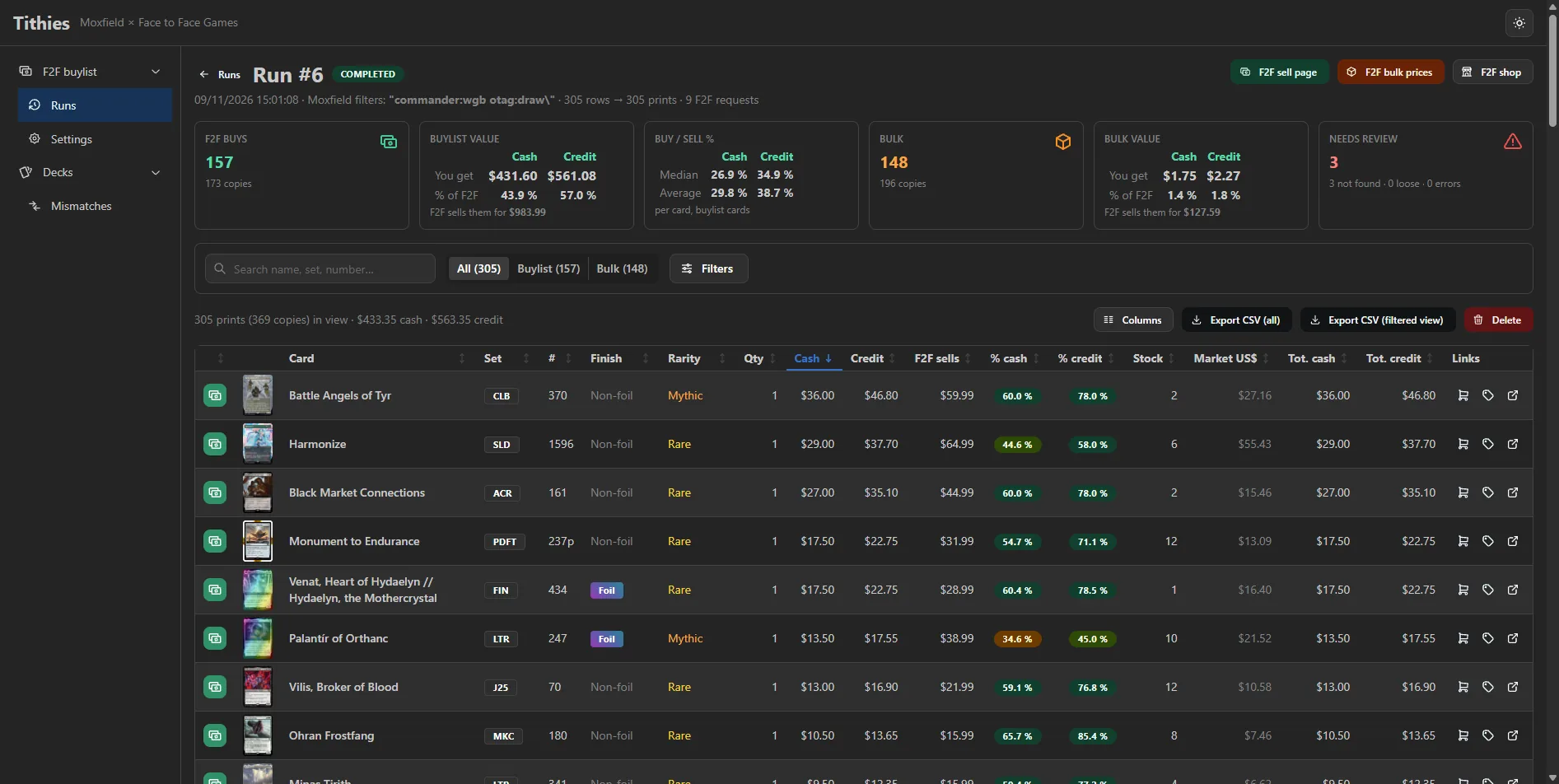
Tithies dashboard: results of an F2F selling price check, with what F2F pays, what it sells each card for, and percentages
Tool 2

Collection comparisons

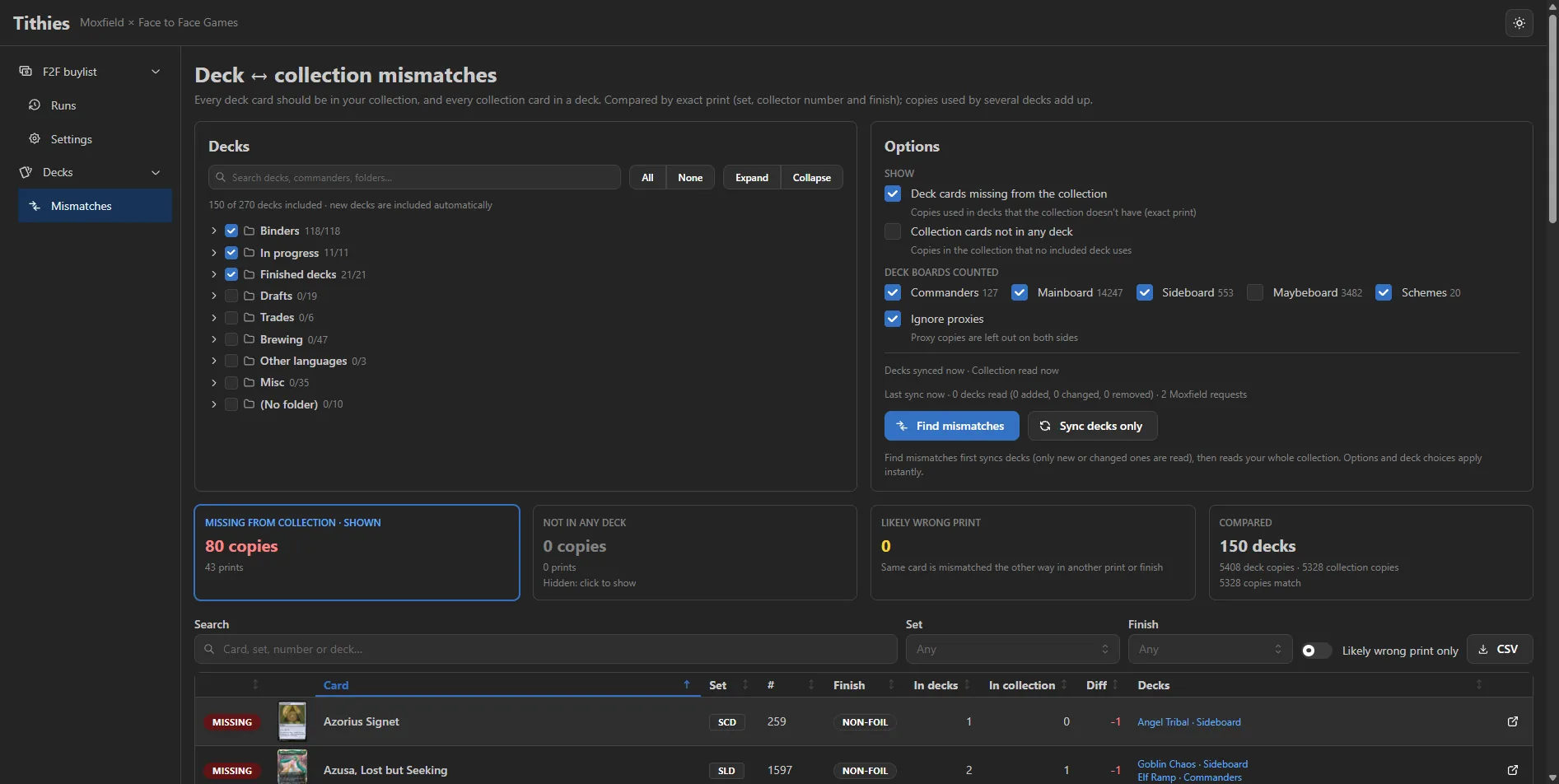
Every card in your decks should also be in your collection, and every collection card in a deck. Tithies lists every exact print where they disagree, with quantities. It's in the dashboard under Decks → Collection comparisons, with presets to switch between sets of decks and options; the first time, Tithies syncs your Moxfield decks, which takes a few minutes.

  • Deck copies missing from the collection, and collection copies in no deck
  • Choose decks and whole Moxfield folders; new decks are included automatically
  • Choose which boards count (maybeboard, sideboard…), and ignore proxies
  • Flags the likely wrong print or finish when the same card differs the other way
  • Decks are kept in the extension: later syncs only read the decks you changed
  • Export the result to a Moxfield binder or collection, of this account or another one: pick the cards, see a live preview of every change, confirmations, and a check of every copy afterwards
Tithies Collection comparisons page: deck folder tree, options and difference counts

Every difference, card by card

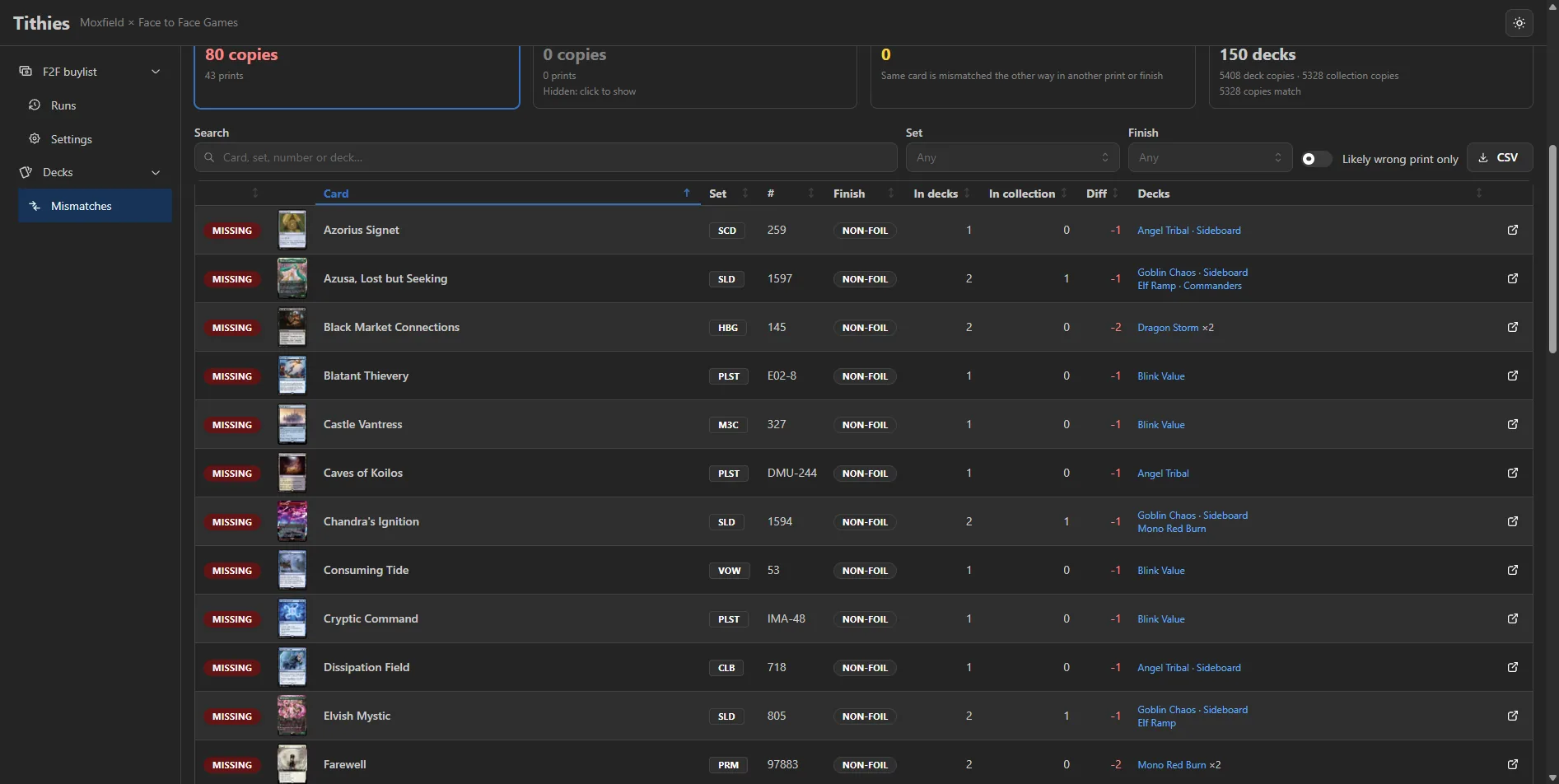
See which decks use each print, how many copies each side has, and export the list to CSV.

Comparison table: cards missing from the collection, with the decks that use them

More tools are on the way. They appear in the same dashboard when you update.

Install in 5 steps

You only do this once. Updating later takes a few seconds (see below).

Download and unzip

Download tithies.zip and unzip it into a folder you'll keep, for example Documents\Tithies.

Chrome runs Tithies from this folder, so don't delete it.

Open the extensions page

Type chrome://extensions in the address bar and press Enter.

In Edge it's edge://extensions, in Brave brave://extensions. Browsers don't let websites link to this page, so paste it yourself.

Turn on Developer mode

Use the Developer mode switch in the top-right corner of that page.

Load the folder

Click Load unpacked and select your Tithies folder (the one that contains manifest.json).

Tithies appears in the list. Its ID should be cihnokdnhnhjamllchdmnehblkekcjbj.

Pin it and go

Click the puzzle-piece icon next to the address bar and pin Tithies. You then use it from:

  • Its toolbar icon , which opens the dashboard. Every tool is in its menu, with its results and settings: Selling and Decks.
  • The Tithies panel, in the bottom-right corner of moxfield.com/collection when you're logged in. It checks the cards in view (see tool 1).
  • The update banner at the top of the dashboard, when a new version is out (see Updating).

Updating

When a new version is out, the Tithies dashboard shows a banner with a download button. Then:

  1. Unzip the new version and replace the files in your Tithies folder with the new ones.
  2. On chrome://extensions, click the reload ↻ icon on the Tithies card.

Your data (F2F runs, synced decks, options) is kept. Don't click Remove to update: removing an extension deletes its data.

Questions

What does Tithies access, and where does my data go?
  • Moxfield: Tithies reads your collection and decks through your open Moxfield tab, using your own session. Your login never leaves that page. If no Moxfield tab is open, Tithies opens one for a few seconds and closes it afterwards. It changes Moxfield only when you confirm an export (create a binder, delete what a replace deletes, import the cards), and the Change log in the dashboard lists every such request, exactly as sent.
  • Face to Face Games: the public search behind F2F's "sell your cards" page, one request at a time.
  • This page: every 6 hours, or when you ask, the dashboard reads version.json here to tell you about updates.

That's all today. There's no Tithies server and no tracking: results stay in your browser. If a future tool contacts another site, this list will say so before the update is published.

Why isn't it on the Chrome Web Store?

It's a small fan project. Loading it yourself gives you exactly the same extension; the only difference is that updates aren't automatic (the dashboard tells you when there's one).

Chrome warns me about developer mode extensions

Chrome may warn about any extension that doesn't come from the Web Store. Close the warning without disabling the extension, and Tithies keeps working.

Is it affiliated with Moxfield or Face to Face Games?

No. Tithies is unofficial and not endorsed by Moxfield or Face to Face Games. Moxfield has no public API: Tithies makes the same requests the Moxfield site makes, one at a time and spaced out.

How do I uninstall it?

On chrome://extensions, click Remove on the Tithies card, then delete the folder. Removing it also deletes Tithies' saved data.

How can I check the download?

Version 0.1.103, published 2026-11-27. SHA-256 of the zip:

26ce8e4f0e55c7118eeb36768f9629f871761f7a5d5fd32848d7939f03b63a21

This version is also available as tithies-0.1.103.zip. The source code is on GitHub.